
Generieren Sie sich ein Passwort. Es öffnet sich ein kleines Overlay-Fenster. Diesen Generator können Sie für alle Passworte verwenden.
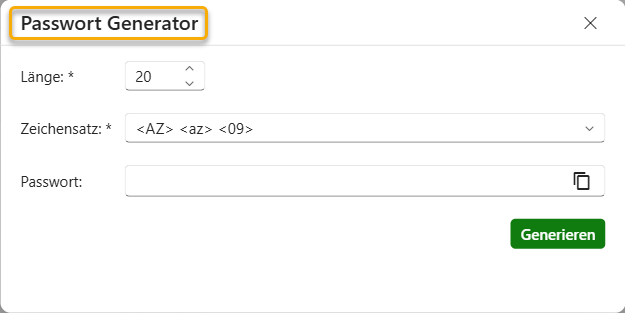
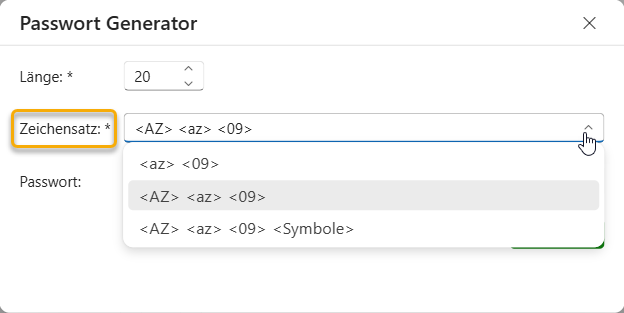
Wählen Sie die Länge Ihres Passwortes, entweder tippen Sie Ihn in das Feld ein oder ändern die Anzahl über die Hoch- und Runterpfeile. Darunter wählen Sie aus, aus welchen Zeichen das Passwort besteht. Entweder aus Kleinbuchstaben und Zahlen, Klein- /Großbuchtstaben und Zahlen oder aus Klein-/Großbuchstaben, Zahlen und Sonderzeichen.
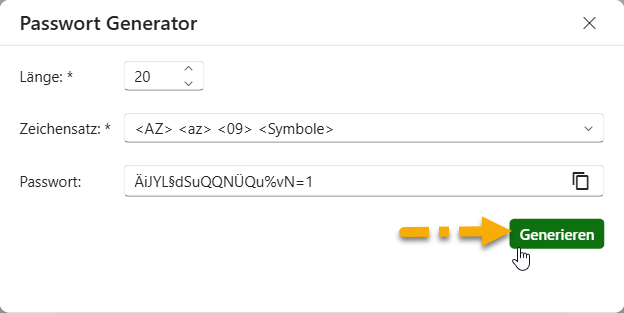
Klicken Sie anschließend unten rechts auf Generieren. In dem Feld „Passwort“ erscheint das generierte Passwort. Klicken Sie in dem Feld auf das Kopier-Icon um, dass Passwort zu kopieren und verwenden. Klicken Sie oben rechts auf das X, um dem Passwort Generator zu schließen. Die generierten Passwärter werden in findes nicht automatisch gespeichert.
| Cookie | Dauer | Beschreibung |
|---|---|---|
| cookielawinfo-checkbox-analytics | 11 months | This cookie is set by GDPR Cookie Consent plugin. The cookie is used to store the user consent for the cookies in the category "Analytics". |
| cookielawinfo-checkbox-functional | 11 months | The cookie is set by GDPR cookie consent to record the user consent for the cookies in the category "Functional". |
| cookielawinfo-checkbox-necessary | 11 months | This cookie is set by GDPR Cookie Consent plugin. The cookies is used to store the user consent for the cookies in the category "Necessary". |
| cookielawinfo-checkbox-others | 11 months | This cookie is set by GDPR Cookie Consent plugin. The cookie is used to store the user consent for the cookies in the category "Other. |
| cookielawinfo-checkbox-performance | 11 months | This cookie is set by GDPR Cookie Consent plugin. The cookie is used to store the user consent for the cookies in the category "Performance". |
| Notwendige Cookies | 11 months | Notwendige Cookies sind absolut notwendig, damit die Website ordnungsgemäß funktioniert. Diese Cookies gewährleisten anonym grundlegende Funktionalitäten und Sicherheitsmerkmale der Website.
|