
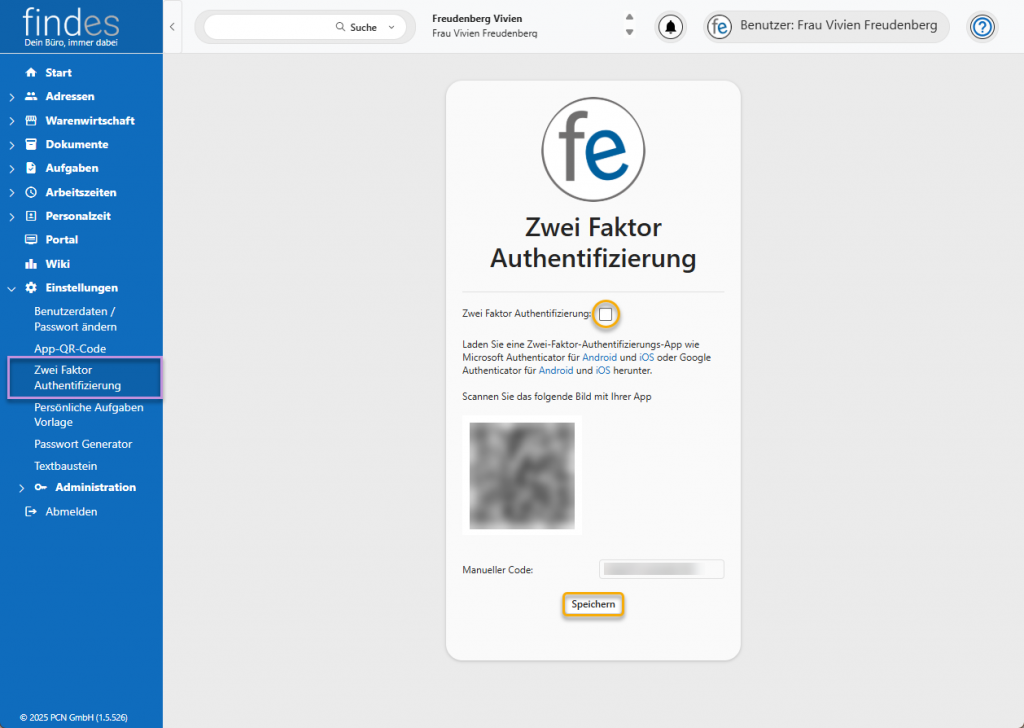
Aktivieren Sie die Zwei-Faktor-Authentifizierung für Ihr individuelles findes. Setzen Sie zunächst den Haken, um die Zwei-Faktor-Authentifizierung bei der Anmeldung zu aktivieren. Laden Sie eine Zwei-Faktor-Authentifizierungs-App in Ihrem Google Play Store oder App Store herunter. Beispiele hierfür sind der Microsoft Authenticator oder Google Authenticator. Scannen Sie in Ihrer Authenticator App den QR-Code oder geben den Code unten manuell ein. Hat das Synchronisieren funktioniert, klicken Sie unten auf Speichern, um die Zwei-Faktor-Authentifizierung zu aktivieren.
| Cookie | Dauer | Beschreibung |
|---|---|---|
| cookielawinfo-checkbox-analytics | 11 months | This cookie is set by GDPR Cookie Consent plugin. The cookie is used to store the user consent for the cookies in the category "Analytics". |
| cookielawinfo-checkbox-functional | 11 months | The cookie is set by GDPR cookie consent to record the user consent for the cookies in the category "Functional". |
| cookielawinfo-checkbox-necessary | 11 months | This cookie is set by GDPR Cookie Consent plugin. The cookies is used to store the user consent for the cookies in the category "Necessary". |
| cookielawinfo-checkbox-others | 11 months | This cookie is set by GDPR Cookie Consent plugin. The cookie is used to store the user consent for the cookies in the category "Other. |
| cookielawinfo-checkbox-performance | 11 months | This cookie is set by GDPR Cookie Consent plugin. The cookie is used to store the user consent for the cookies in the category "Performance". |
| Notwendige Cookies | 11 months | Notwendige Cookies sind absolut notwendig, damit die Website ordnungsgemäß funktioniert. Diese Cookies gewährleisten anonym grundlegende Funktionalitäten und Sicherheitsmerkmale der Website.
|